
Back in March 2024, we published our predictions for Power BI’s biggest developments, highlighting five essential tips for maximising your data visualisation capabilities. Fast forward to early 2026, and the Power BI landscape has transformed dramatically especially with the emergence of Copilot for Power BI. Let’s revisit those predictions and explore how Microsoft has pushed the boundaries of what’s possible with business intelligence.
Reflecting on 2024’s Core Principles
Our original article focused on five timeless principles: clean data, data modelling mastery, DAX expertise, leveraging AI insights, and creating powerful visuals. These fundamentals remain as critical as ever—but Microsoft has revolutionised how we execute on them.
The Microsoft Fabric Integration: A Game-Changing Shift
Perhaps the most significant development since our 2024 article is the full integration of Power BI into Microsoft Fabric. What started as an announcement has become the new reality for Power BI users.
What Changed?
Power BI Premium P-SKUs were retired at the end of 2024, with customers migrating to Fabric F-SKUs capacity licensing. This isn’t just a licensing change, it represents a fundamental shift in how organisations approach their entire data analytics stack. Microsoft Fabric combines Power BI with Azure Data Factory, Azure Synapse Analytics, and additional workloads into a unified platform with OneLake at its core.
What this means for you:
- Single source of truth: All data lives in OneLake, eliminating duplicate copies and ensuring consistency
- End-to-end workflows: Handle data ingestion, transformation, modelling, and reporting without switching platforms
- Enhanced governance: Security policies and data lineage tracking apply uniformly from raw data through to final reports
- Real-time capabilities: Native support for streaming data and real-time analytics that batch-based Power BI refreshes couldn’t handle
If you’re still using standalone Power BI, you can continue doing so. However, organisations with complex data engineering needs, real-time processing requirements, or ML initiatives will find Fabric provides the comprehensive platform they need.
Copilot: AI Has Arrived in Power BI
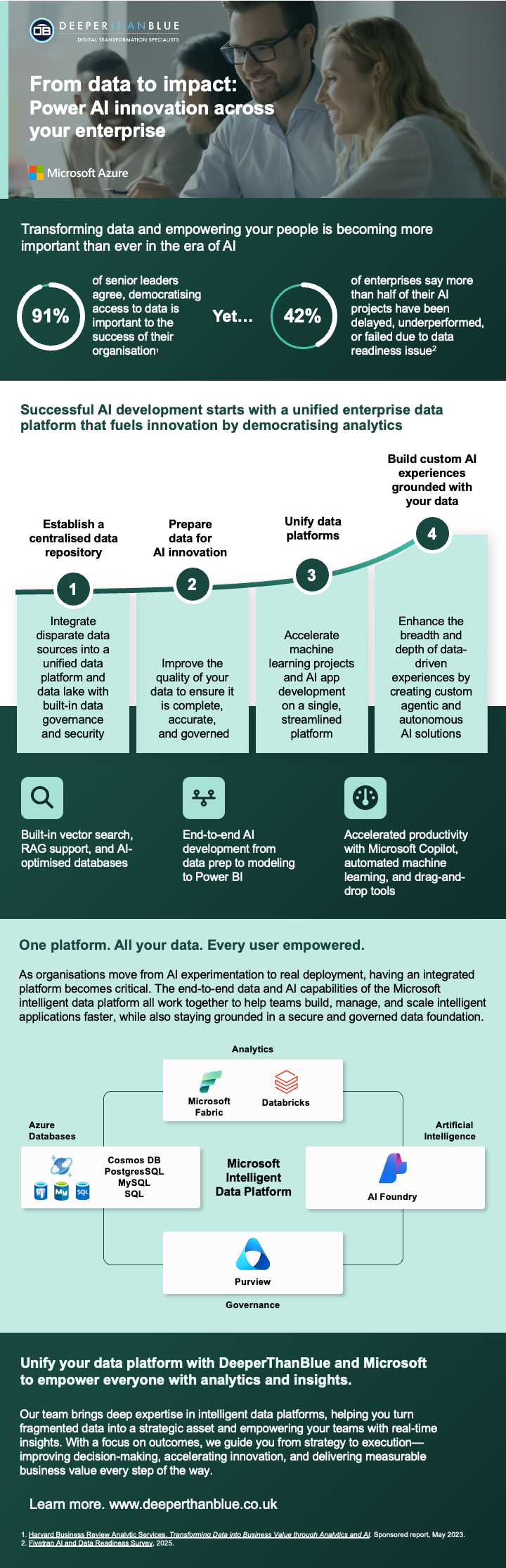 Remember when we recommended using Quick Insights and Azure integration to unearth patterns in your data? That feels almost quaint now. Microsoft has embedded generative AI directly into Power BI through Copilot, fundamentally changing how we interact with data.
Major Copilot Developments
Chat with Your Data (2025): The standalone Copilot experience allows users to ask natural language questions about any report, semantic model, or data agent they have access to. Instead of opening specific reports, you can simply ask “What were sales in Q4 2024?” and Copilot for Power BI finds the right data source and provides filtered, inline responses.
Report Creation and Editing: Copilot now builds entire report pages from simple prompts. Even more impressively, it can modify existing reports—adding visuals, changing layouts, and refining displays based on conversational instructions. The system understands your data structure and recommends appropriate visualisations automatically.
Mobile AI: Copilot came to Power BI Mobile apps in late 2025, bringing natural language data exploration to smartphones through voice or text queries.
DAX Made Accessible: Copilot for Power BI can now generate measure descriptions automatically and assist with DAX formula creation, making complex calculations more approachable for users who aren’t DAX experts.
SharePoint Integration: As of August 2025, Copilot works in embedded Power BI reports within SharePoint, allowing users to engage with AI directly in their embedded report experience.
The Q&A Deprecation
Microsoft announced in December 2025 that the legacy Q&A feature will be deprecated in December 2026. This consolidation makes sense – Copilot’s generative AI capabilities far exceed what Q&A could deliver, providing more accurate, flexible, and contextual responses.
Web Modelling: Desktop Parity Achieved
One of 2025’s most anticipated features reached general availability: the ability to create and edit Power BI semantic models directly in the Power BI service. This establishes core data modelling parity between Power BI Desktop and the web-based service.
Why this matters:
- Full workflow in the cloud: Handle everything from data ingestion with Power Query to modelling and report generation without switching between desktop and cloud
- Automatic saves: Changes save automatically with semantic model version history
- Collaboration: Teams can work on models simultaneously without desktop app dependencies
- MacOS users can now develop complete solutions in their browser
This development addresses one of the platform’s long-standing limitations and opens Power BI development to a broader audience.
Enhanced Data Modelling Capabilities
Our 2024 article emphasised mastering data modelling with star schema designs and proper relationships. Microsoft has expanded these capabilities significantly:
Direct Lake and Composite Models
Direct Lake semantic models, which read data directly from OneLake without importing it, have matured considerably. The January 2026 update introduced composite semantic models in public preview, allowing you to mix Direct Lake tables with import tables in a single model, giving you the best of both worlds.
Calendar Intelligence
September 2025 brought a calendar-based approach to time intelligence, allowing organisations to define custom calendars (fiscal years, 4-5-4 retail calendars) directly in their data models. This makes handling non-standard business calendars dramatically simpler.
TMDL (Tabular Model Definition Language)
Fabric Git integration now exports semantic models as TMDL instead of a single JSON file. This folder-based format significantly improves source control, making it easier to track commit history and resolve merge conflicts, which is critical for team collaboration.
Visual Experience Improvements
While we advocated for focused, simple, and user-centric visuals in 2024, Microsoft has enhanced the visualisation toolkit considerably:
Modern Visual Tooltips
Modern visual tooltips became generally available in January 2026, providing more engaging and informative hover experiences.
New Card Visual
The updated card visual (generally available November 2025) completely replaces the previously limited card functionality, offering far more flexibility and visual appeal.
Azure Maps Evolution
Power BI transitioned from Bing Maps to Azure Maps through 2025, bringing enhanced geospatial capabilities including customisable markers, path layers for mapping connections between locations, and improved base map customisation.
Matrix Enhancements
Matrices now support automatic column width expansion, eliminating manual adjustments and improving readability across different data volumes.
Data Connectivity and Performance
Several under-the-radar improvements enhance Power BI’s data handling:
- Snowflake query tags: Queries to Snowflake now include contextual information for better monitoring
- Direct Lake improvements: Drillthrough limitations with Direct Lake and DirectQuery models have been removed
- GB18030-2022 character set support: Critical for organisations working with Chinese language data
- Report Performance Analyzer enhancements: Better tools for identifying and resolving performance bottlenecks
The Evolution of DAX
Our original tip about mastering DAX remains essential, but Copilot has made the learning curve less steep. Beyond AI assistance, Microsoft continues enhancing the DAX experience with improved syntax highlighting (different bracket colours arrived in late 2023) and better calculation group functionality.
Microsoft Fabric Roadmap Tool
For organisations planning their Power BI and Fabric strategy, Microsoft introduced the Fabric Roadmap Tool, bringing all feature timelines to a single location. This transparency helps businesses plan migrations and feature adoption more effectively.
What Hasn’t Changed
Despite these remarkable advancements, our original five tips remain foundational:
- Clean your data: No amount of AI can compensate for poor data quality
- Master data modelling: Proper star schemas and relationships underpin everything
- Learn DAX: While Copilot helps, understanding the language makes you more effective
- Focus on insights: Quick Insights has evolved into Copilot, but the principle remains—let AI surface patterns you might miss
- Create intuitive visuals: Advanced features are worthless if end users can’t understand your reports
Looking Ahead: What’s Coming
Power BI celebrated its 10-year anniversary in 2025 with community celebrations, global contests, and the Power BI Data Visualization World Championships. The platform shows no signs of slowing down.
Key events on the horizon:
- FabCon + SQLCon Americas 2026 (March 16-20, Atlanta): The ultimate Power BI, Microsoft Fabric, and data community event
- Continued AI evolution: Expect Copilot for Power BI capabilities to expand further
- Fabric feature maturity: As more organisations migrate to Fabric, expect rapid feature development
The Bottom Line
When we wrote about Power BI’s big bets in 2024, we couldn’t have predicted how dramatically AI would reshape the platform. Copilot for Power BI hasn’t just added features, it’s fundamentally changed how users interact with their data. Combined with the Fabric integration, web modelling parity, and continuous visual improvements, Power BI has evolved from a powerful business intelligence tool into a comprehensive, AI-powered analytics platform.
The principles we outlined in 2024 remain vital, but the tools to execute them have become exponentially more sophisticated. Whether you’re just starting with Power BI or looking to leverage these new capabilities, the platform has never been more capable, or more accessible.
These might interest you
Business Analytics Design & Development
We use Business Analytics to help your business plan, monitor and perform. Our solutions help you look forwards not just backwards Read MoreThe Big Bets for Power BI for 2024
Power BI is a market leader in data visualisation. It can help your business transform its data into clear, Read MoreGet Expert Guidance on Power BI and Microsoft Fabric
Navigating the evolving Power BI landscape requires expertise. At DeeperThanBlue, we help organisations leverage the latest Power BI and Microsoft Fabric capabilities to transform how they store, access, and use their data.
From clean data architecture to Copilot implementation and Fabric migration planning, get in contact with us to discover how we can help your business unlock the full potential of these powerful platforms.
+44 (0)114 399 2820
info@deeperthanblue.com
Get in touch