

At DeeperThanBlue, we often find ourselves diving deep into the intricacies of IBM MQ environments and effective queue management. Whether it’s diagnosing queue manager issues, preparing for upgrades, or identifying redundancy in a system, one thing is consistent: the need to understand the configuration in detail is a must.
Traditionally, this means working with MQSC (Message Queue Scripting Command) scripts—a powerful but often cryptic format that’s not exactly user-friendly. For many, MQSC is a necessary evil: essential for configuration, but difficult to interpret, audit, or analyse at scale.
But what if there was a better way?
Why Configuration Visibility Matters
In IBM MQ environments, configuration is everything. It underpins effective queue management – how messages flow, how systems interact, and ultimately how resilient and performant your integration landscape is. Yet in many organisations—particularly those with long-standing MQ estates—configuration clarity is often the first casualty of time.
Over the years, environments evolve. New queues are added to support projects, channels are introduced for integrations that may no longer exist, and security or routing rules are adjusted—sometimes without full documentation or consistent change control. Different teams come and go, each leaving their own footprint. The result is a queue management and configuration landscape that works… but isn’t fully understood.
This lack of visibility becomes a serious constraint in three critical scenarios:
- Diagnosing issues: When something goes wrong, pinpointing the root cause quickly depends on understanding how components are configured and interrelated. Without that clarity, troubleshooting becomes slow, reactive, and heavily reliant on tribal knowledge rather than structured insight to support effective queue management.
- Preparing for upgrades or migrations: Whether moving to a newer MQ version or modernising infrastructure, you need confidence in what’s actually in use versus what’s simply still configured. Unknown dependencies or overlooked components can derail otherwise well-planned upgrades.
- Identifying redundancy and inefficiency: It’s remarkably common to find unused queues, orphaned channels, or duplicated configurations in mature environments. These artefacts not only add unnecessary complexity but can also introduce risk, consume resources, and complicate governance.
Put simply, if you don’t fully understand your MQ configuration, you’re operating with a blind spot. And in integration, blind spots tend to surface at the worst possible moment.
Reimagining MQSC: From Script to Spreadsheet
Very few teams think to convert MQSC dumps into a format that’s more accessible and insightful. That’s where our approach comes in.
At DeeperThanBlue, we’ve developed a conversion process that transforms Message Queue Scripting Command scripts into structured CSV data, which we then import into a tailored Excel workbook. This isn’t just a formatting exercise—it’s a game-changer for visibility, analysis, and decision-making.
Why Convert MQSC to CSV?
- Converting MQSC to CSV makes queue management significantly more accessible and actionable:
- Human-readable format: Excel makes it easy to scan, filter, and sort data.
- Instant insights: Conditional formatting highlights anomalies and misconfigurations.
- Custom views: Tailor filters to focus on specific queue types, channels, or properties.
- Audit-ready: Generate summaries for compliance and documentation.
- No need for live access: Analyse configurations offline, without touching production systems.
How It Works
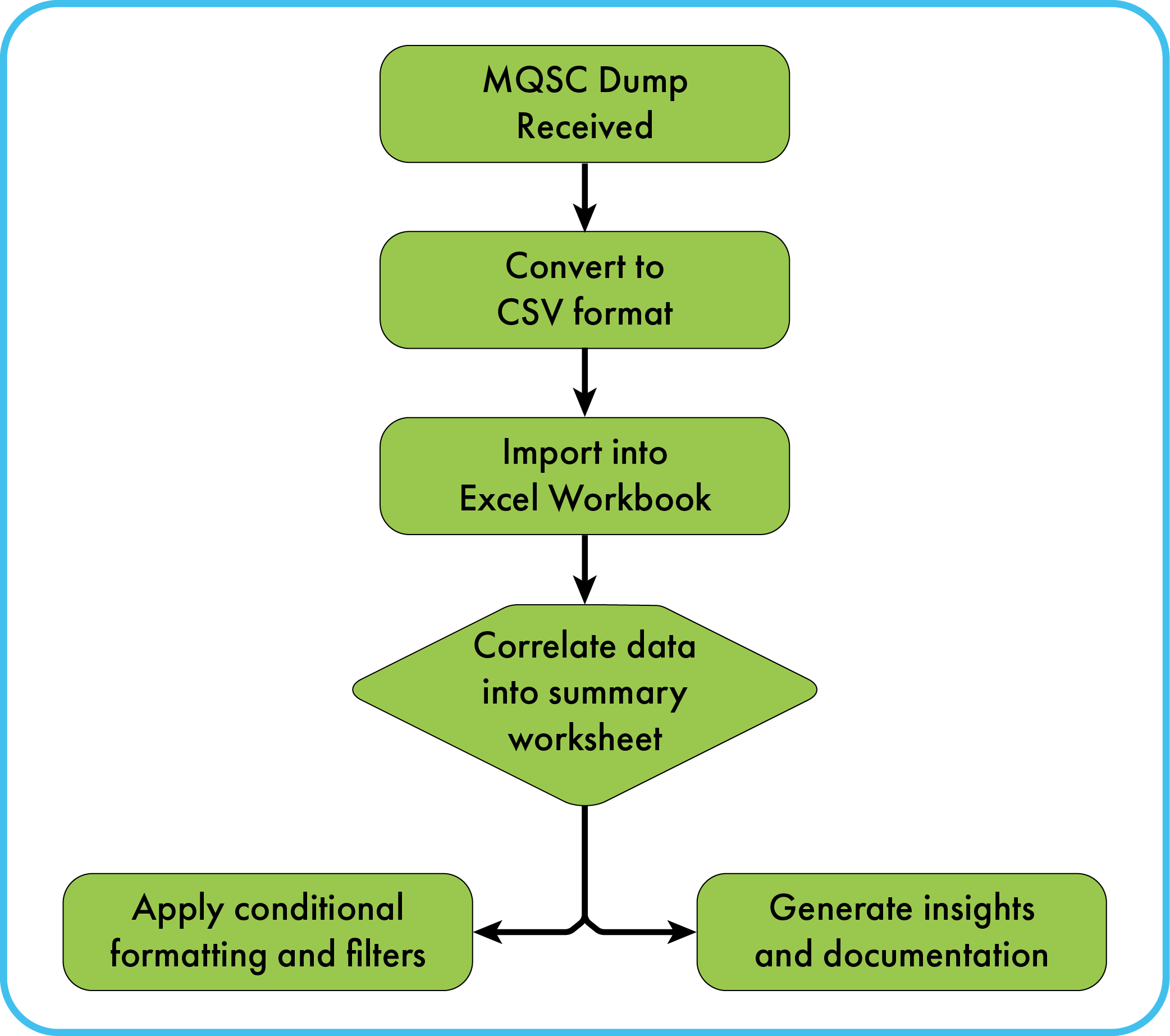
Here’s a simplified view of the process:
- MQSC Dump Received
A full export of the queue manager configuration. - Convert to CSV Format
Our tooling parses the Message Queue Scripting Command and structures it into usable data. - Import into Excel Workbook
Data is loaded into a pre-configured workbook with multiple sheets. - Correlate Data into Summary Worksheet
Relationships and dependencies are mapped out. - Apply Conditional Formatting & Filters
Highlighting potential issues and enabling targeted analysis. - Generate Insights & Documentation
Create reports, audit logs, and monitoring recommendations.
Why This Matters
This approach is especially useful for improving visibility and control in queue management scenarios where:
- You need to understand a queue manager without direct access.
- You’re preparing for a migration or upgrade.
- You’re troubleshooting recurring issues.
- You want to establish a baseline for monitoring.
It’s a simple idea, but one that unlocks a whole new level of clarity and control.
These might interest you
Do you need help to unravel your Message Queue Configuration?
If you’re sitting on a pile of Message Queue Scripting Command (MQSC) scripts and wondering how to make sense of them and bring greater control to your queue management, we’d love to help. Our conversion tooling is part of our broader integration toolkit, and we’re happy to tailor it to your environment.
Get in touch with our integration team or visit CXOne MQ Systems Monitor to learn more.
+44 (0)114 399 2820
info@deeperthanblue.com
Get in touch